Gaming Keyboard Splitter
github.com/djlastnight/k...

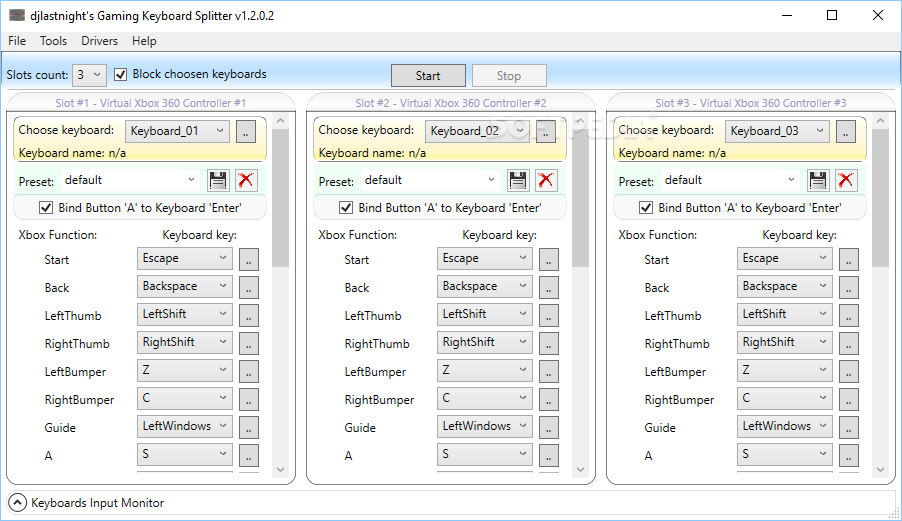
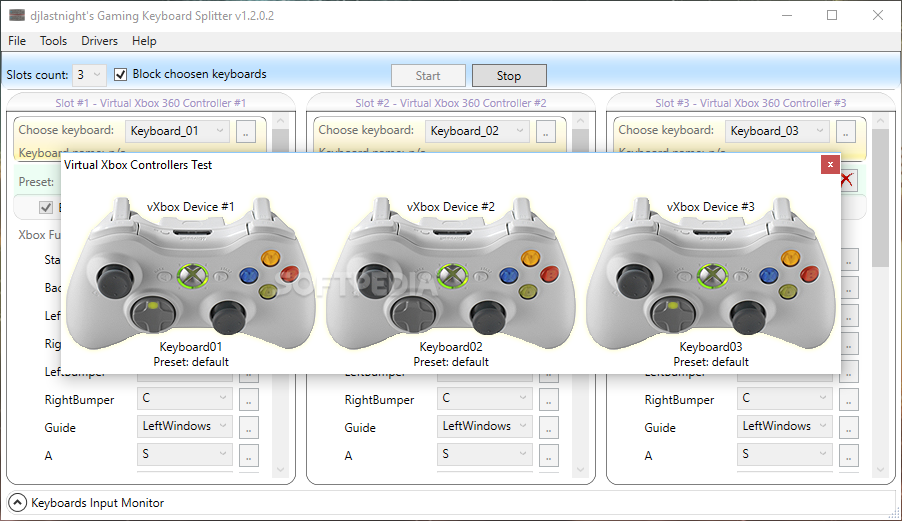
Gaming Keyboard Splitter is a free, open-source utility for Windows that enables multiple USB keyboards to function as independent input devices. By creating up to four virtual Xbox 360 controllers, it allows each connected keyboard to control a separate gamepad, facilitating multiplayer gaming sessions on a single PC.(Softpedia)


🎮 Key Features

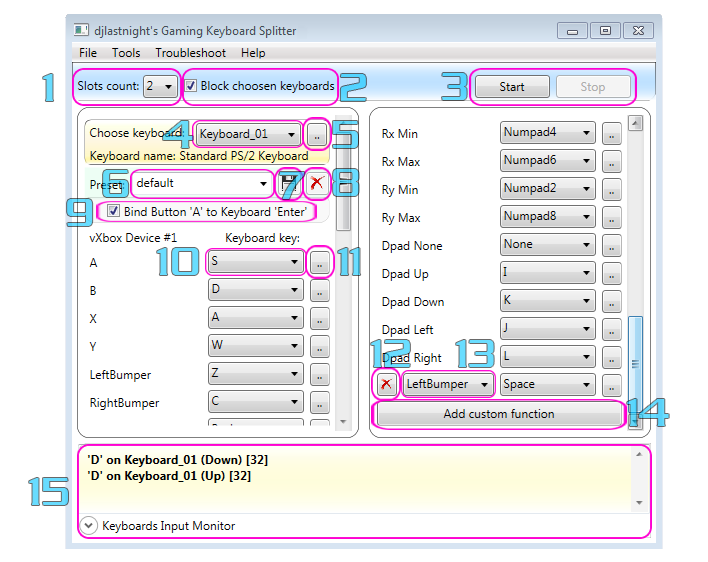
  • Multiple Keyboard Support: Connect up to 10 USB keyboards, with each assigned to one of four virtual Xbox 360 controllers. (APKPure)
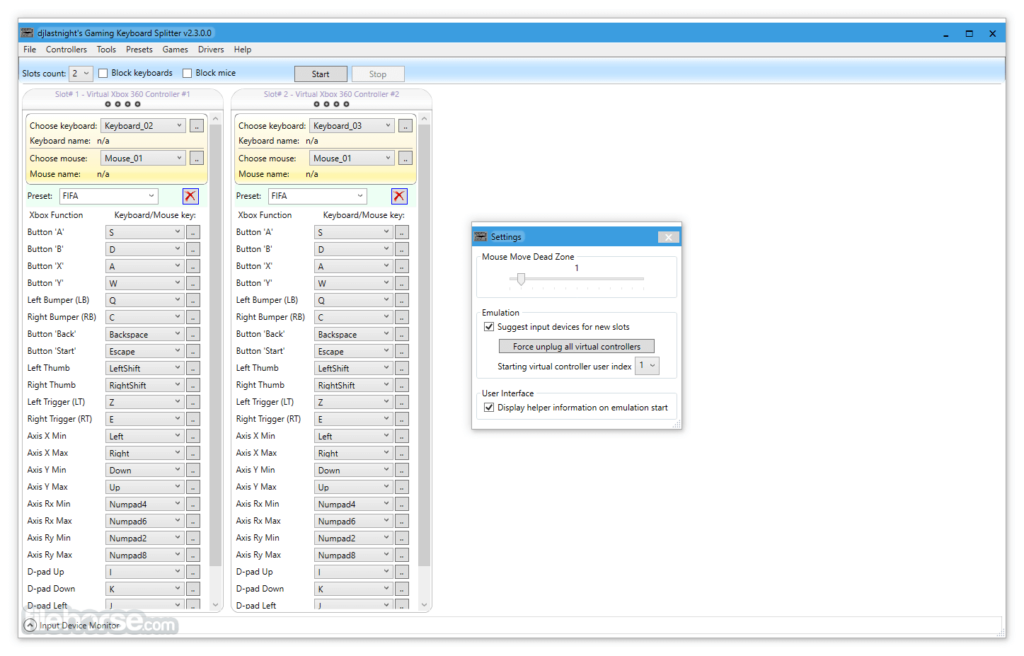
  • Customizable Mappings: Assign specific keyboard keys to virtual gamepad buttons, including triggers, D-pad directions, and thumbsticks.
  • Preset Management: Create and manage multiple presets for different games or applications, allowing for quick configuration changes.
  • Real-Time Detection: Automatically detects connected keyboards and updates the input mappings accordingly. (Uptodown)
  • Input Monitoring: Monitor key presses in real-time to ensure accurate mapping and responsiveness. (FileHorse)

⚙️ System Requirements

  • Operating System: Windows 7, 8.1, 10, or 11.(NorseCorp)
  • Required Drivers:
    • Microsoft Xbox 360 Controller Driver (for Xbox 360 controller emulation).
    • Interception Driver (for keyboard input detection).
    • Microsoft Visual C++ Redistributable 2013 (x86).
    • DirectX 9.0c (or newer). (apunkagamer.com, FileHorse)

✅ Pros

  • Free and Open Source: No cost to use, with source code available for customization.
  • Enhanced Multiplayer Experience: Allows multiple players to use separate keyboards for local multiplayer games.(Softpedia)
  • Customizable Input Mappings: Tailor key assignments to suit personal preferences or specific game requirements.
  • Portable Application: No installation required; can be run directly from a USB drive.

⚠️ Cons

  • Manual Driver Installation: Requires users to manually install necessary drivers, which may be complex for some users.(FileHorse)
  • Limited Controller Support: Emulates Xbox 360 controllers; may not be compatible with all games or applications.(SaaS Discovery)
  • Windows Only: Not available for macOS or Linux platforms.

📥 Download

You can download Gaming Keyboard Splitter from the official GitHub repository:(FileHorse)

https://github.com/djlastnight/KeyboardSplitterXbox(GitHub)

If you need assistance with installation or configuration, feel free to ask!

InputMapper
inputmapper.download

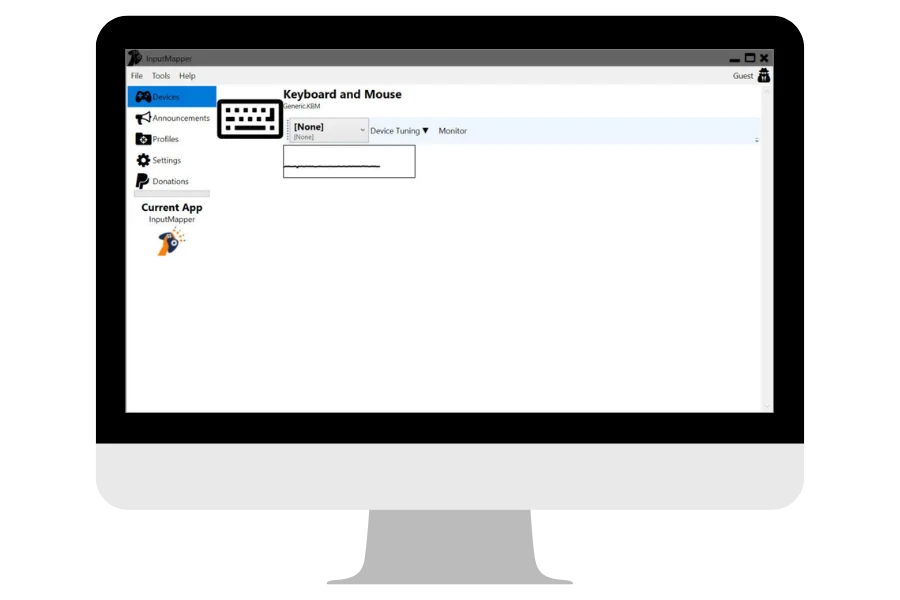
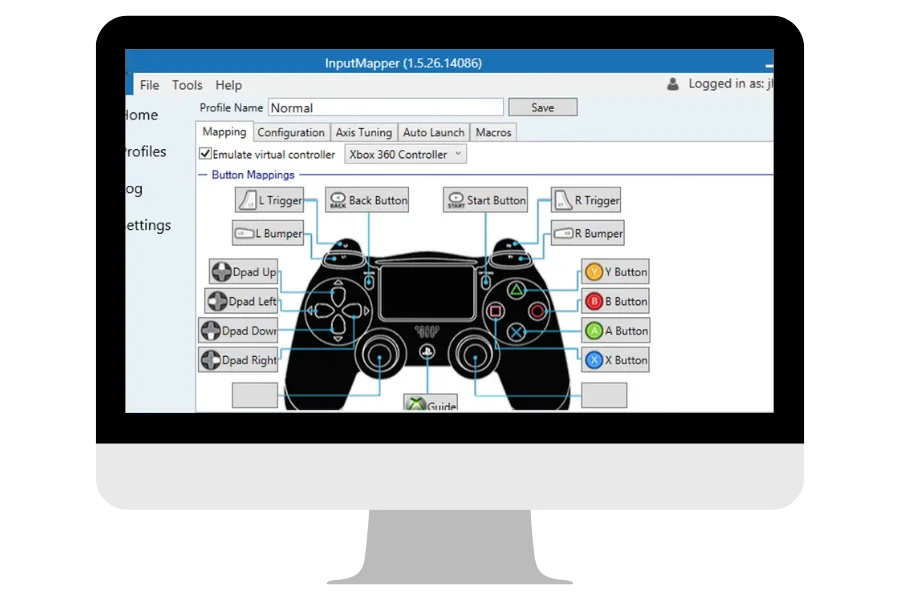
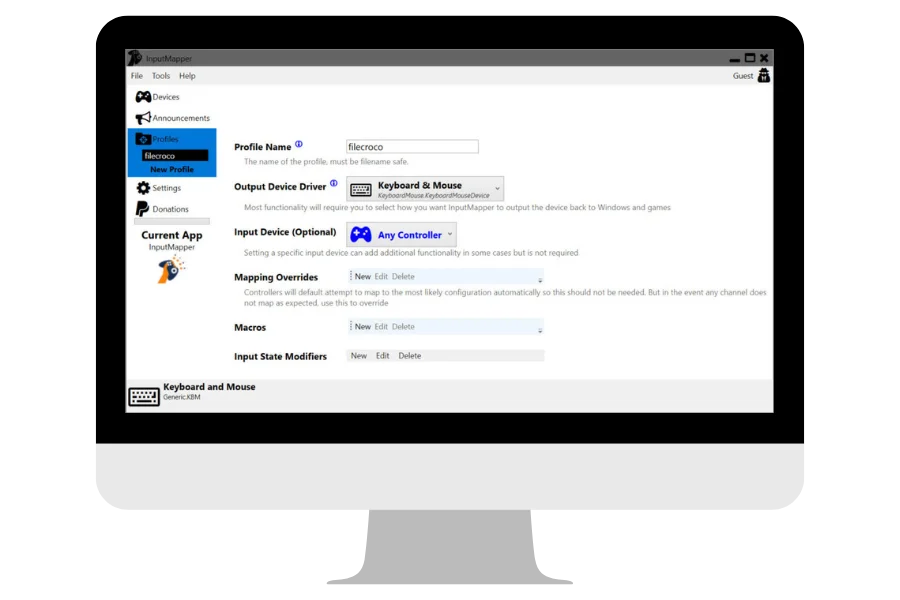
InputMapper is a free, open-source Windows application designed to enhance the gaming experience by enabling seamless integration of console controllers—such as PlayStation (DualShock 4, DualSense) and Xbox controllers—into PC games and applications that may not natively support them. It allows users to remap controller inputs to keyboard and mouse actions, providing greater flexibility and customization. (inputmapper.download, Sugggest)


🎮 Key Features

  • Controller Mapping: Remap controller buttons to keyboard and mouse inputs, allowing compatibility with games that lack native controller support. (inputmapper.download)
  • Macro Creation: Set up complex input sequences and assign them to controller buttons for advanced gameplay strategies. (inputmapper.download)
  • Profile Management: Create and manage multiple profiles to switch between different controller configurations for various games or applications.
  • Bluetooth and USB Connectivity: Connect controllers via Bluetooth or USB, ensuring a stable and responsive gaming experience. (inputmapper.download)
  • Battery Level Notifications: Receive alerts when your controller’s battery is low, helping to avoid interruptions during gameplay. (inputmapper.download)
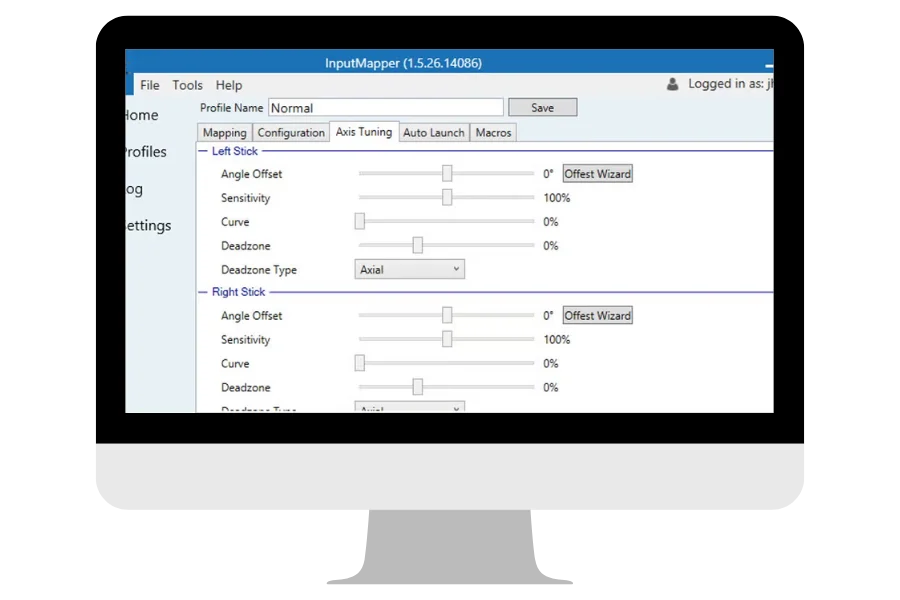
  • Improved Controller Mapping UI: An updated interface makes remapping buttons and adjusting sensitivity more intuitive and user-friendly. (inputmapper.download)

🖥️ System Requirements

  • Operating System: Windows 7, 8, 10, or 11 (64-bit recommended)
  • Processor: Intel Core i5 or equivalent
  • Memory: 4GB RAM
  • Storage: Approximately 72.2 MB of available disk space(Softpedia)
  • Connectivity: Bluetooth or USB port for controller connection(inputmapper.download)

✅ Pros

  • Free and Open-Source: No cost to use, with source code available for transparency and community contributions. (input-mapper.en.softonic.com)
  • Wide Controller Support: Compatible with various controllers, including PlayStation and Xbox models. (InputMapper Download)
  • Customizable Profiles: Easily switch between different configurations tailored to specific games or applications.
  • Active Development: Regular updates and an active community contribute to continuous improvement.

⚠️ Cons

  • Windows-Only: Currently, InputMapper is only available for Windows operating systems. (inputmapper.download)
  • Learning Curve: Some users may find the interface and advanced features require a bit of time to master.

📥 Download

👉 Download InputMapper


If you need assistance with installation or configuring specific settings, feel free to ask!

Hot Virtual Keyboard
hotvirtualkeyboard.com

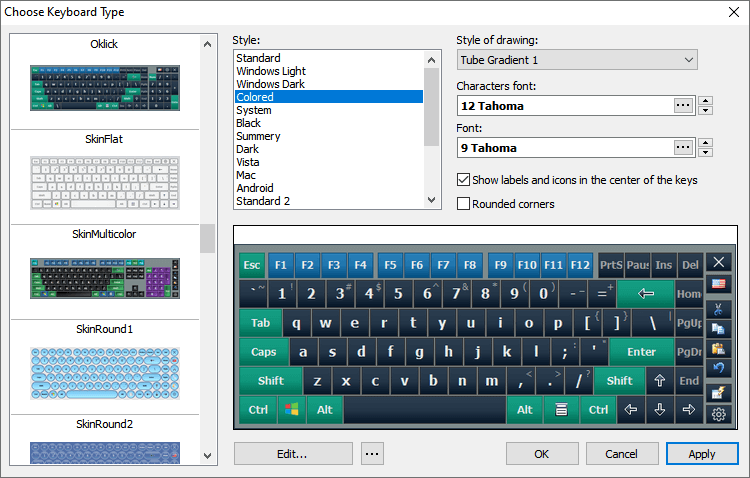
Hot Virtual Keyboard is a versatile on-screen keyboard application designed to enhance typing efficiency and accessibility on Windows-based devices. It is particularly beneficial for users with mobility impairments, touchscreen devices, or those seeking a customizable typing interface.


🔑 Key Features

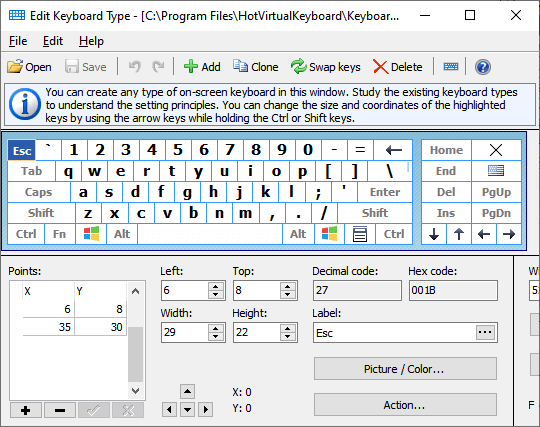
  • Customizable Keyboard Layouts: Choose from over 60 pre-designed keyboard layouts or create your own by adjusting key shapes, sizes, fonts, and colors.
  • Programmable Keys and Shortcuts: Assign specific actions to keys, such as launching applications, opening websites, or executing macros, to streamline workflows. (FreeDownloadManager)
  • Text Suggestions: Utilize word auto-complete features to speed up typing by predicting words after entering just one or two letters. (Hot Virtual Keyboard)
  • Gestures Support: Perform actions like typing capital letters, inserting spaces, or deleting words using touch gestures, enhancing the typing experience on touchscreen devices. (Hot Virtual Keyboard)
  • Multi-Touch Support: Compatible with Windows 7 and later versions, allowing for simultaneous input from multiple touch points. (FreeDownloadManager)
  • Accessibility Features: Designed to assist users with disabilities, providing an alternative input method for those who may have difficulty using a physical keyboard.

💻 System Requirements

  • Operating Systems: Windows 7, 8, 8.1, 10, 11, and Windows Server editions. (FileHorse)
  • Touchscreen Devices: Optimized for use with tablets, kiosks, and other touch-enabled devices. (ul.gpii.net)

✅ Pros

  • Highly Customizable: Offers extensive options to tailor the keyboard’s appearance and functionality to individual preferences.(hotvirtualkeyboard.en.download.it)
  • Enhanced Typing Efficiency: Features like text suggestions and programmable keys can significantly reduce typing time.(FileHorse)
  • Accessibility: Provides an alternative input method for users with physical disabilities.
  • Multi-Language Support: Supports multiple languages and keyboard layouts, accommodating a global user base. (Hot Virtual Keyboard)

⚠️ Cons

  • Learning Curve: The extensive customization options may require time to fully master.(hotvirtualkeyboard.en.download.it)
  • Trial Limitations: The free trial version is fully functional but expires after 30 days; a license purchase is required for continued use. (Hot Virtual Keyboard)

📥 Download

You can download Hot Virtual Keyboard from the official website: (Hot Virtual Keyboard)


If you need assistance with installation or configuration, feel free to ask!
Iris

Iris is a comprehensive eye protection and productivity software designed to reduce digital eye strain, improve sleep quality, and enhance overall well-being during prolonged screen use. Developed by IrisTech, it offers a range of features tailored to various user needs, from students and professionals to gamers and biohackers.(FileHorse)


🌟 Key Features

  • Blue Light Reduction: Automatically adjusts your screen’s color temperature to minimize blue light exposure, promoting better sleep patterns.
  • Brightness Control Without Flicker: Modulates screen brightness without introducing PWM flicker, reducing eye discomfort and headaches. (LinuxBabe)
  • Ambient Light Matching: Synchronizes screen brightness with surrounding light conditions, creating a more comfortable viewing experience. (iristech.co)
  • Customizable Presets: Offers 9 preset modes, including Health, Sleep, Reading, Programming, and more, to suit different activities. (iristech.co)
  • Advanced Customization: Provides over 20 advanced settings for users to create personalized profiles tailored to their specific needs. (iristech.co)
  • Cross-Platform Support: Available for Windows, macOS, Linux, iOS, and Android, ensuring protection across various devices. (Iris)

💻 System Requirements

  • Windows: Windows 7 or later
  • macOS: macOS 10.12 (Sierra) or later(Iris)
  • Linux: Ubuntu-based distributions
  • Mobile Devices: iOS 11.0 or later; Android 5.0 or later

💰 Pricing

Iris offers a free version with essential features and a Pro version priced at $15 for a one-time purchase. The Pro version includes lifetime access to the current version, free minor updates, and the ability to transfer the license to a new machine. (iristech.co)


✅ Pros

  • Enhanced Eye Comfort: Reduces eye strain and discomfort during extended screen use.(iristech.co)
  • Improved Sleep Quality: Helps regulate sleep patterns by minimizing blue light exposure.(livevitae.com)
  • Customizable Settings: Allows users to tailor the software to their specific needs and preferences.(livevitae.com)
  • Cross-Platform Availability: Ensures protection across various devices and operating systems.(FileHorse)

⚠️ Cons

  • Learning Curve: Some users may find the multitude of settings and options overwhelming initially.(iristech.co)
  • Resource Usage: Running Iris alongside other applications may consume additional system resources.

📥 Download

👉 Download Iris


If you need assistance with installation or configuring specific settings, feel free to ask!

Kali Linux (32-bit)


🛠️ Key Features

  • Comprehensive Security Toolkit: Includes hundreds of pre-installed tools for penetration testing, vulnerability assessment, forensic analysis, and network security. (kali.org/tools)
  • Live Boot Option: Can be run directly from a USB drive or DVD without installation, making it portable and flexible for fieldwork. (kali.org/docs/usb-live)
  • Customizable Environment: Supports multiple desktop environments, such as XFCE, GNOME, and KDE, allowing users to tailor the interface to their preferences. (kali.org/docs/desktop-environments)
  • Regular Updates: Kali Linux is frequently updated with new tools, patches, and security enhancements to stay current with cybersecurity trends. (kali.org/docs/updating)
  • Extensive Documentation: Offers comprehensive guides, tutorials, and community support to assist users in deploying and utilizing its tools effectively. (kali.org/docs)

💻 System Requirements


✅ Pros

  • Extensive Security Tools: Preloaded with a wide range of tools for ethical hacking and cybersecurity research. (kali.org/tools)
  • Portability: Live boot functionality allows Kali to run without installation. (kali.org/docs/usb-live)
  • Highly Customizable: Users can modify desktop environments and tools according to their needs. (kali.org/docs/desktop-environments)
  • Strong Community Support: Active forums and documentation help troubleshoot issues and provide learning resources. (kali.org/docs)

⚠️ Cons

  • Steep Learning Curve: Not suitable for beginners; requires knowledge of Linux and cybersecurity concepts. (kali.org/docs)
  • Security Risks: Using Kali Linux without proper precautions may expose systems to vulnerabilities or accidental misuse of tools. (kali.org/docs/tools)
  • Resource Intensive: Some tools and desktop environments may require higher system specifications for optimal performance. (kali.org/docs/installation/hardware-requirements)

📥 Download

👉 Download Kali Linux 32-bit


If you want, I can also provide a simplified beginner-friendly description for Kali Linux to include in a casual guide or post. Do you want me to do that?

iTop Easy Desktop
itopvpn.com/user-manual/...

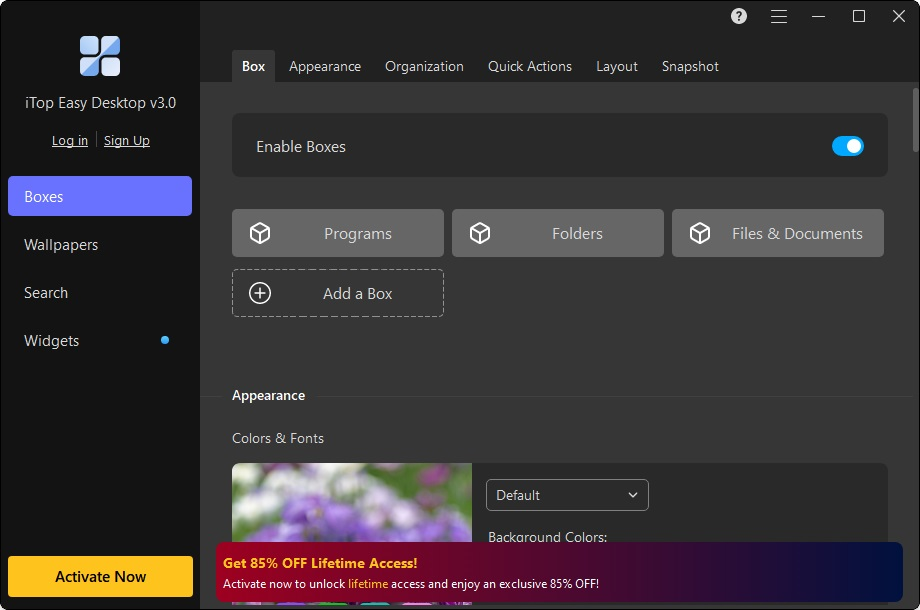
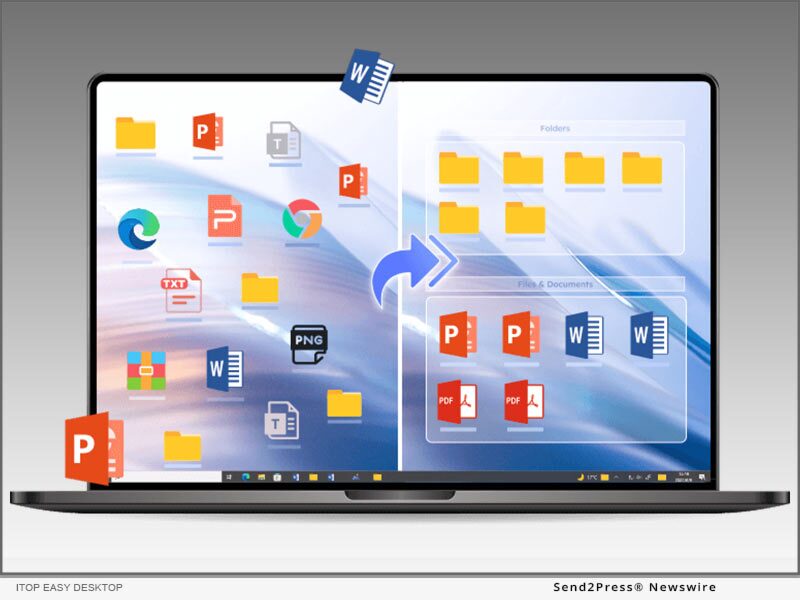
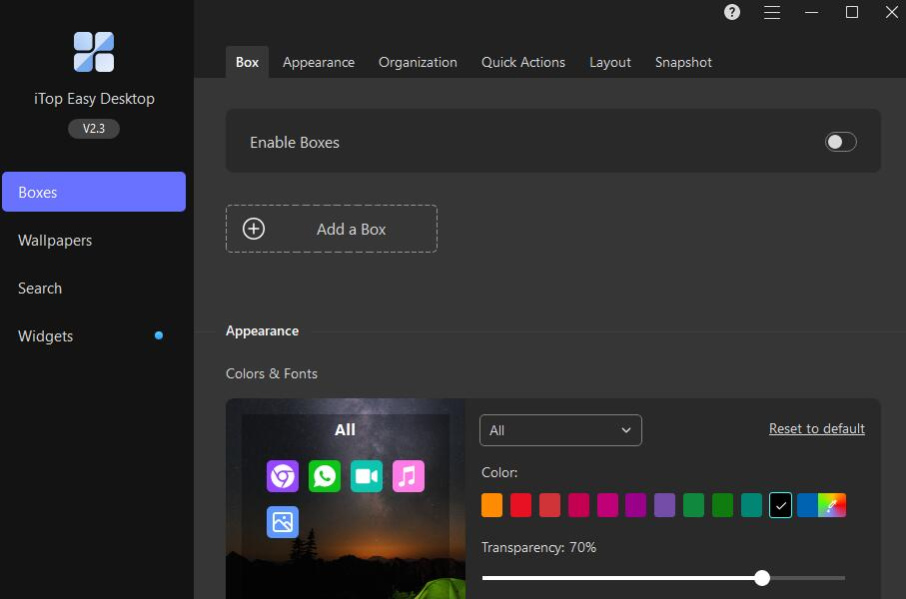
iTop Easy Desktop is a free Windows application designed to help users organize and declutter their desktop by automatically grouping icons, files, and folders into customizable boxes. This tool enhances productivity by providing a clean and efficient workspace.(iTop VPN)


🧩 Key Features

  • Auto-Organization with Boxes: Automatically categorizes desktop items into boxes such as “Office Tools,” “Games,” and “Documents,” making it easier to locate and access files. (Management Works Media)
  • Customizable Layouts: Allows users to adjust box sizes, colors, transparency, and fonts to personalize the desktop appearance. (iTop VPN)
  • Widgets for Productivity: Includes widgets like Calendar, Weather, Clock, iNotes, and ChatAI to provide quick access to essential information and tools. (iTop VPN)
  • Folder Portal: Enables quick access to frequently used folders directly from the desktop. (iTop VPN)
  • Private Box: Provides a secure area to store sensitive files, accessible only with a password.
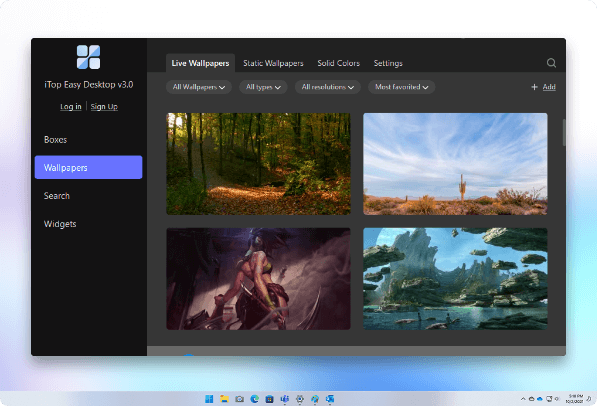
  • Wallpaper Customization: Offers a variety of static and dynamic wallpapers to enhance the desktop’s visual appeal. (iTop VPN)

✅ Pros

  • User-Friendly Interface: Intuitive design suitable for users of all technical levels.(FileHorse)
  • Free to Use: Offers a full set of features without any cost.
  • Cross-Version Compatibility: Supports Windows 7, 8, 10, and 11.
  • Enhances Productivity: Keeps the desktop organized, reducing time spent searching for files.(Send2Press Newswire)

⚠️ Cons

  • Windows Only: Currently available only for Windows operating systems.
  • Learning Curve: Some users may need time to adjust to the new layout and features.

📥 Download

👉 Download iTop Easy Desktop


If you need assistance with installation or configuring specific settings, feel free to ask!

ZArchiver for PC

Here’s a detailed long description of ZArchiver for PC:


ZArchiver for PC is a versatile and powerful file compression and archiving tool that allows users to create, extract, and manage archives on Windows computers. Designed as a PC adaptation of the popular Android app, ZArchiver combines simplicity, speed, and robust functionality, making it ideal for users who need to handle compressed files across a wide variety of formats.

The application supports numerous archive types, including ZIP, 7Z, RAR, TAR, GZ, XZ, BZIP2, and more, both for extraction and creation. Users can compress files using multiple compression algorithms, adjust compression levels, and split large archives into smaller volumes for easier storage or transfer. Its broad compatibility ensures that files downloaded from the internet or shared from different platforms can be accessed without needing additional software.

ZArchiver for PC provides a user-friendly interface with drag-and-drop functionality, enabling users to quickly create or extract archives without navigating complex menus. Advanced features include the ability to view and edit archive contents without fully extracting them, add or remove files from existing archives, and set passwords with strong AES-256 encryption to protect sensitive data.

Another key feature is partial extraction, which allows users to extract only selected files from an archive instead of the entire content, saving time and storage space. The software also supports multi-threaded operations, ensuring faster performance on modern multi-core processors, and is lightweight, consuming minimal system resources even when handling large archives.

ZArchiver for PC is ideal for both casual and professional users who need a reliable, secure, and flexible archiving solution. Whether you are organizing documents, preparing files for sharing, backing up important data, or working with large collections of multimedia, ZArchiver provides the tools needed to efficiently manage compressed files with confidence.

In summary, ZArchiver for PC is a comprehensive, fast, and secure archive management tool that supports a wide range of formats, offers advanced features like partial extraction and encryption, and delivers an intuitive user experience. It is an excellent choice for anyone seeking a versatile file compression and extraction solution for Windows.


Wise Data Recovery Portable

Here’s a detailed long description of Wise Data Recovery Portable:


Wise Data Recovery Portable is a lightweight, efficient, and fully portable data recovery tool designed for Windows that helps users quickly retrieve lost or accidentally deleted files without the need for installation. As a portable application, it can run directly from a USB drive or external storage device, making it convenient for IT professionals, technicians, and everyday users who need a flexible solution for emergency data recovery on multiple computers.

The software is capable of recovering a wide variety of file types, including documents, images, videos, audio files, emails, and compressed archives. It works across different storage media such as hard drives, USB flash drives, memory cards, and other removable devices, providing versatility for both personal and professional recovery scenarios.

Wise Data Recovery Portable features a fast scanning engine that can perform both quick scans for recently deleted files and deep scans for more complex recovery situations. Users are presented with a clear, organized list of recoverable files, including information about file name, location, type, and recovery probability, which helps prioritize the most likely successful recoveries.

The application’s portable nature ensures that it does not require installation, preventing accidental overwriting of lost data on the target drive—a common issue with installed recovery tools. Its user-friendly interface allows even beginners to navigate the recovery process with ease, while advanced users can benefit from its detailed scan results and file filtering options.

While Wise Data Recovery Portable excels in convenience and speed, it is also designed with safety in mind. All recovered files can be saved to a location of the user’s choice, ensuring that the original drive remains untouched and minimizing the risk of further data loss. This makes it ideal for scenarios such as accidental deletion, system crashes, virus attacks, or formatting errors.

In summary, Wise Data Recovery Portable is a fast, reliable, and easy-to-use data recovery solution that provides flexible, installation-free access to powerful file recovery features. Its portability, wide file type support, and intuitive interface make it an essential tool for anyone needing to recover lost or deleted files on Windows computers and removable storage devices.


Wii U USB Helper

Here’s a detailed long description of Wii U USB Helper:


Wii U USB Helper is a popular Windows application designed to help users conveniently download, manage, and back up digital games and content for the Nintendo Wii U and Nintendo 3DS systems. Built with a clean, easy-to-use interface, the tool quickly became a favorite among Nintendo enthusiasts for organizing their digital libraries and preparing titles for installation on consoles.

The main purpose of Wii U USB Helper is to allow users to download and manage game backups that can be installed on a Wii U or 3DS using compatible homebrew software. Games, updates, and downloadable content (DLC) can be organized within the application, ensuring players have a streamlined way to maintain their collections. Once downloaded, titles can be transferred to an SD card or USB device for installation on the console.

One of the program’s standout strengths is its user-friendly organization system. Games are displayed with metadata, including cover art, title, region, and size, making it easy to browse large collections at a glance. Users can sort or filter games, manage updates, and ensure they have the latest patches before transferring to their systems.

Wii U USB Helper also includes support for automatic game updates and DLC management, so players can keep their installations up to date without having to track files manually. The ability to store and manage multiple libraries on external drives or a PC provides flexibility for collectors and players who want to maintain extensive game archives.

Another key advantage is its transfer and preparation tools, which simplify the process of copying titles to SD cards or USB devices in the correct format for installation. This eliminates much of the technical complexity that would otherwise be involved, making it accessible even to casual users exploring the Wii U and 3DS homebrew scene.

While Nintendo has since discontinued official support for the Wii U and 3DS eShops, Wii U USB Helper remains an important utility for enthusiasts looking to preserve their digital collections and keep older hardware useful. However, it should be noted that the program is intended for backing up legally owned games, and downloading copyrighted content without ownership is against Nintendo’s terms of service and copyright law.

In summary, Wii U USB Helper is a practical, well-designed tool for organizing, backing up, and preparing Wii U and 3DS games for installation. With features like automatic updates, easy transfer options, and a polished interface, it continues to be a valuable resource for players and collectors who want to maintain access to their digital libraries long after the official eShops have closed.


WinRAR (32-bit)

Here’s a detailed long description of WinRAR (32-bit):


WinRAR (32-bit) is a powerful and widely used file compression and archive management application for Windows that allows users to efficiently compress, encrypt, and extract files in a variety of formats. Known for its speed, reliability, and flexibility, WinRAR has become one of the most trusted tools for handling compressed archives, especially for users working with large files or collections of data.

The application provides full support for the proprietary RAR format as well as popular standards like ZIP, 7Z, TAR, GZ, ISO, and CAB, among many others. Its advanced compression algorithms are optimized for both performance and space-saving, often producing smaller archives than competing tools. This makes it particularly valuable when sharing files over email, saving storage space, or transferring data across networks.

WinRAR (32-bit) is designed with both power and accessibility in mind. Beginners benefit from its clean, user-friendly interface and wizard mode, which guides them through the process of creating and extracting archives step by step. Power users, meanwhile, can take advantage of advanced features such as solid archiving, recovery records for damaged files, multi-volume archives, and customizable compression settings tailored to specific needs.

Security is another key strength of WinRAR. The program supports AES-256 bit encryption, enabling users to protect sensitive files with strong passwords. Additional features like archive locking and file authenticity verification help ensure data integrity and security when sharing archives across the internet.

Beyond compression and extraction, WinRAR offers tools for splitting large files into smaller volumes, making it easy to store or transfer oversized files across different storage devices. It also integrates directly with Windows Explorer, allowing users to create or extract archives with a simple right-click, without needing to open the main program window.

Despite being lightweight, WinRAR is capable of handling extremely large archives—up to 8 billion gigabytes in size—making it suitable for both personal and professional use. The 32-bit version is optimized for compatibility with older or less powerful Windows systems, ensuring that even users with legacy hardware can benefit from its robust functionality.

In summary, WinRAR (32-bit) is a comprehensive, secure, and efficient archive management tool that balances ease of use with advanced functionality. Whether you need to compress files to save space, protect sensitive data with encryption, or extract archives from the internet, WinRAR provides a reliable solution trusted by millions worldwide.


WinZip (32-bit)

Here’s a detailed long description of WinZip (32-bit):


WinZip (32-bit) is a widely recognized and powerful file compression and archiving utility for Windows that enables users to efficiently compress, encrypt, and manage files. Designed for both personal and professional use, WinZip simplifies file storage, sharing, and transfer by significantly reducing file sizes while maintaining data integrity and accessibility.

The application supports a broad range of file formats, including ZIP, ZIPX, RAR, 7Z, TAR, GZIP, and more, making it versatile for handling almost any type of archive. Its advanced compression algorithms optimize storage space and ensure faster file transfer over email or network connections, which is particularly useful for large documents, media files, and project folders.

WinZip (32-bit) combines powerful functionality with user-friendly design. Beginners can easily create, extract, and manage archives through the intuitive interface, while advanced users benefit from features such as batch compression, split archives, self-extracting ZIP files, and automated backup options. The application also integrates seamlessly with Windows Explorer, allowing users to zip or unzip files directly via right-click menus without opening the main program.

Security is a major focus of WinZip. The software includes AES-256 bit encryption, password protection, and secure file sharing options, ensuring that sensitive data remains private and protected during storage or transmission. Users can also access built-in tools for file integrity verification, preventing data corruption during compression or extraction.

Beyond compression and encryption, WinZip offers additional utilities such as file backup, cloud storage integration, and PDF conversion. It supports popular cloud services including Google Drive, Dropbox, OneDrive, and Box, enabling users to zip, encrypt, and upload files directly to the cloud with minimal effort. This makes WinZip a comprehensive solution for modern file management, both offline and online.

The 32-bit version of WinZip is optimized for compatibility with older Windows systems, providing the same powerful features while requiring minimal system resources. Its combination of speed, security, and ease of use has made it one of the most trusted archive management tools worldwide.

In summary, WinZip (32-bit) is a reliable, versatile, and secure file compression and management tool. Whether for reducing file sizes, protecting sensitive information, or efficiently managing archives, it provides all the features needed to simplify digital file handling for both personal and professional users.


Wii Backup Manager

Here’s a detailed long description of Wii Backup Manager:


Wii Backup Manager is a versatile and feature-rich utility designed to help Nintendo Wii owners organize, transfer, and manage their game backups with ease. Unlike older tools limited to the WBFS file system, Wii Backup Manager supports a wide range of formats, including WBFS, FAT32, and NTFS, making it a flexible and modern solution for storing and loading Wii game backups on external USB drives or SD cards.

The application’s primary function is to transfer and convert Wii game ISO files into formats compatible with popular Wii USB loaders such as USB Loader GX, Configurable USB Loader, and WiiFlow. Users can add multiple ISO or WBFS files, convert them into the desired format, and copy them directly onto a drive in just a few clicks. Wii Backup Manager automatically handles file splitting for large games when working with FAT32, ensuring smooth compatibility without requiring manual adjustments.

One of the program’s strongest features is its intuitive interface. Games added to the manager are displayed in an organized list with details such as title, region, size, and game ID, making it easy to browse and manage large collections. The software also supports batch operations, allowing users to add, remove, or transfer multiple games simultaneously, saving time when building or updating a library.

In addition to file transfer and conversion, Wii Backup Manager provides tools for verifying game integrity, renaming titles, and even downloading game cover artwork for enhanced organization. Users can also extract games back from a WBFS drive to standard ISO files, ensuring flexibility when moving backups between systems or sharing with other utilities.

Because it supports multiple storage formats, Wii Backup Manager eliminates the limitations of the older WBFS-only system. FAT32 and NTFS compatibility mean that users can store Wii backups alongside other files on the same drive, maximizing space efficiency and simplifying data management.

Lightweight and efficient, Wii Backup Manager runs smoothly on most Windows systems and has become a trusted utility in the Wii homebrew community. It continues to be a go-to solution for players who want to preserve their Wii game library, reduce wear on physical discs, and enjoy a seamless experience with USB loaders.

In summary, Wii Backup Manager is a powerful, flexible, and user-friendly application for managing Wii game backups. With support for multiple file systems, batch transfers, file verification, and cover downloads, it provides everything Wii users need to keep their game collections safe, organized, and ready to play.


WBFS Manager (64-bit)

Here’s a detailed long description of WBFS Manager (32-bit):


WBFS Manager (32-bit) is a lightweight yet powerful application that allows users to easily manage and transfer game backups to a USB drive formatted with the WBFS (Wii Backup File System). Specifically designed for Windows systems, this tool became one of the most popular utilities for Wii enthusiasts who wanted a simple way to organize, load, and play their game backups using USB loaders on a modified Nintendo Wii console.

The main purpose of WBFS Manager is to format USB drives into the WBFS file system and then add or remove Wii game ISO files. By converting and transferring games onto a WBFS partition, the program saves storage space while ensuring compatibility with Wii homebrew loaders. Users can quickly copy games from their computer to a USB device, manage existing titles, or delete unwanted backups with just a few clicks.

One of the standout features of WBFS Manager is its clean and user-friendly interface, which makes it accessible even for beginners. The application automatically detects connected WBFS-formatted drives and displays available games, including details such as game title, ID, and size. This helps users easily organize their collections without needing to deal with complex command-line tools.

Other useful features include the ability to extract ISO images back from a WBFS drive, batch-add multiple games at once, and create backups of game discs for safe storage. WBFS Manager also supports splitting large ISO files into smaller chunks to bypass the file-size limitations of FAT32 systems, which is particularly helpful for users transferring files between computers and Wii USB loaders.

While newer tools and file systems have since replaced WBFS for many Wii users, WBFS Manager (32-bit) remains a reliable and widely used option, especially for those running older systems or who want to maintain compatibility with WBFS-based setups. It is lightweight, requires minimal system resources, and runs smoothly on most Windows versions.

In summary, WBFS Manager (32-bit) is a practical and easy-to-use utility that simplifies the process of transferring, organizing, and managing Wii game backups on WBFS-formatted USB drives. For gamers who still use WBFS-based loaders, it continues to be a trusted tool for maintaining and enjoying their Wii game library.


WBFS Manager (32-bit)

Here’s a detailed long description of WBFS Manager (32-bit):


WBFS Manager (32-bit) is a lightweight yet powerful application that allows users to easily manage and transfer game backups to a USB drive formatted with the WBFS (Wii Backup File System). Specifically designed for Windows systems, this tool became one of the most popular utilities for Wii enthusiasts who wanted a simple way to organize, load, and play their game backups using USB loaders on a modified Nintendo Wii console.

The main purpose of WBFS Manager is to format USB drives into the WBFS file system and then add or remove Wii game ISO files. By converting and transferring games onto a WBFS partition, the program saves storage space while ensuring compatibility with Wii homebrew loaders. Users can quickly copy games from their computer to a USB device, manage existing titles, or delete unwanted backups with just a few clicks.

One of the standout features of WBFS Manager is its clean and user-friendly interface, which makes it accessible even for beginners. The application automatically detects connected WBFS-formatted drives and displays available games, including details such as game title, ID, and size. This helps users easily organize their collections without needing to deal with complex command-line tools.

Other useful features include the ability to extract ISO images back from a WBFS drive, batch-add multiple games at once, and create backups of game discs for safe storage. WBFS Manager also supports splitting large ISO files into smaller chunks to bypass the file-size limitations of FAT32 systems, which is particularly helpful for users transferring files between computers and Wii USB loaders.

While newer tools and file systems have since replaced WBFS for many Wii users, WBFS Manager (32-bit) remains a reliable and widely used option, especially for those running older systems or who want to maintain compatibility with WBFS-based setups. It is lightweight, requires minimal system resources, and runs smoothly on most Windows versions.

In summary, WBFS Manager (32-bit) is a practical and easy-to-use utility that simplifies the process of transferring, organizing, and managing Wii game backups on WBFS-formatted USB drives. For gamers who still use WBFS-based loaders, it continues to be a trusted tool for maintaining and enjoying their Wii game library.


Syncthing

Here’s a detailed long description of Syncthing:


Syncthing is a free, open-source, and decentralized file synchronization application that enables users to securely sync files between devices without relying on cloud services. Designed with privacy and transparency in mind, Syncthing gives users full control over their data, ensuring that files are shared directly between devices rather than stored on third-party servers. This peer-to-peer model makes it an excellent solution for individuals, teams, and organizations that want reliable file sharing without compromising security or ownership of their information.

At its core, Syncthing uses peer-to-peer synchronization powered by secure TLS encryption, meaning data is encrypted during transfer and authenticated to prevent unauthorized access. Each device has a unique cryptographic ID, ensuring that only explicitly authorized devices can join a sync network. Unlike traditional cloud-based systems, no central authority or account is required—files remain in your hands at all times.

Syncthing runs cross-platform on Windows, macOS, Linux, BSD, Solaris, Android, and even NAS systems, making it versatile for both desktop and mobile users. The application automatically detects changes to files and syncs them in real time, ensuring that the latest versions are instantly available across all connected devices. It also supports versioning, so older copies of modified or deleted files can be preserved and restored if needed.

A key strength of Syncthing is its flexibility and scalability. It can handle small personal setups—such as syncing documents between a laptop and phone—as well as larger networks involving multiple computers across different locations. Its decentralized architecture avoids the limitations of cloud storage providers, such as storage caps, subscription fees, and regional data restrictions.

The user interface is web-based and intuitive, providing easy configuration through a browser while still allowing advanced users to customize settings and manage devices at a granular level. Power users also appreciate features like selective synchronization, bandwidth throttling, folder sharing permissions, and detailed logs for monitoring activity.

Because Syncthing is open source, it benefits from a global community of developers and contributors who continuously improve performance, security, and usability. Regular updates ensure the software remains robust and secure against emerging threats.

In summary, Syncthing is a secure, private, and open-source alternative to cloud storage and file syncing platforms. By putting control of data back into the user’s hands, it offers an efficient and transparent way to keep files synchronized across multiple devices without sacrificing privacy, flexibility, or reliability.


Syncovery

Here’s a comprehensive long description of Syncovery:


Syncovery is a professional-grade backup and synchronization software designed for Windows, macOS, and various server environments. Built with flexibility and reliability in mind, it caters to individuals, small businesses, and enterprises that need powerful tools to safeguard and manage large volumes of data across multiple devices, servers, and cloud platforms.

At its core, Syncovery offers highly customizable backup and synchronization options. Users can choose between one-way backups, two-way syncs, and real-time mirroring, ensuring that files remain protected and consistent regardless of where they are stored. The software supports local drives, external storage, network shares, FTP/SFTP servers, and popular cloud services such as Google Drive, Dropbox, OneDrive, Amazon S3, Backblaze B2, and many others, making it an all-in-one solution for hybrid storage environments.

One of Syncovery’s standout features is its smart, versioned backups. Instead of overwriting files, the program can keep multiple versions of modified or deleted files, giving users the ability to restore older data when needed. This is complemented by advanced scheduling tools, allowing automated backups at precise intervals, with options for email notifications, conditional runs, and scripted actions for power users.

Syncovery is engineered for efficiency and reliability. It uses a multi-threaded file transfer engine, enabling fast and stable copying even with massive datasets or millions of small files. It also includes built-in compression and AES-256 encryption to optimize storage use and keep sensitive data secure during transfer and storage.

For synchronization tasks, Syncovery goes beyond basic file mirroring. Its SmartTracking mode carefully analyzes changes on both sides of a sync job to avoid accidental deletions or overwrites, making it ideal for professionals working on shared projects or using multiple computers. Real-time sync ensures immediate updates whenever changes are detected, while block-level copying transfers only the modified portions of large files, saving both time and bandwidth.

Despite its advanced capabilities, Syncovery is designed with an intuitive user interface that balances power and ease of use. Beginners can rely on the step-by-step Profile Wizard, while IT professionals can access fine-grained controls, command-line operation, and automation features suitable for complex backup strategies.

In summary, Syncovery is a reliable, secure, and highly adaptable backup and synchronization solution that scales from personal file protection to enterprise-level data management. Whether you need to protect critical business data, synchronize files across platforms, or automate cloud backups, Syncovery provides the tools and performance to get the job done with confidence.


SyncBackFree

Here’s a detailed long description of SyncBackFree:


SyncBackFree is a powerful and versatile backup and synchronization software for Windows that helps users protect their data, manage files, and ensure important information is never lost. Developed by 2BrightSparks, this free edition of the SyncBack family is designed for home users and small businesses who want reliable backup solutions without unnecessary complexity or cost.

At its core, SyncBackFree allows users to create customized backup, restore, and synchronization profiles. Whether you want to safeguard critical documents, photos, music, or project files, the program provides flexible options to copy files from one location to another—between drives, network folders, external storage, or even FTP servers. Its straightforward setup wizard and intuitive interface make it accessible to beginners, while advanced users can configure detailed rules and filters for precise control.

One of the standout features of SyncBackFree is its synchronization capability. Files can be kept identical across multiple devices or folders, ensuring that changes made in one location are mirrored in another. This is particularly useful for users who work on multiple computers or need to maintain consistent data between an office and a home environment.

The program also supports incremental backups, which means only files that have changed since the last backup are copied, saving both time and storage space. Users can schedule automatic backups at specific times or intervals, making it easy to maintain data protection without manual effort.

SyncBackFree is lightweight and efficient, consuming minimal system resources during operation. It is also highly reliable, with built-in verification to confirm that files are copied correctly. In addition, the software offers extensive logging, allowing users to review backup history and spot issues quickly.

While SyncBackFree provides an impressive set of features at no cost, it also integrates smoothly with paid versions (SyncBackSE and SyncBackPro), which add advanced options such as cloud storage support, encryption, scripting, and enhanced security. This makes it easy for users to upgrade if their backup needs expand over time.

In summary, SyncBackFree is a dependable, flexible, and user-friendly backup and synchronization tool that helps Windows users safeguard their data with ease. Whether you need to protect personal files, synchronize folders between devices, or schedule regular backups, SyncBackFree delivers a trusted solution that balances simplicity with robust performance.


Sync

Here’s a comprehensive long description of Sync (often referred to as Sync.com):


Sync is a secure cloud storage and file sharing application designed to give individuals and businesses complete control over their digital files while prioritizing privacy. Unlike many other cloud services, Sync is built around a zero-knowledge encryption model, ensuring that only the user—not even the service provider—can access the contents of stored data. This makes it an ideal solution for anyone who needs to safeguard sensitive information while still enjoying the convenience of cloud-based storage and collaboration.

With Sync, files are automatically backed up and synchronized across all connected devices. Whether you’re working on a desktop, laptop, tablet, or smartphone, your files remain consistent and up to date everywhere. The application integrates seamlessly into Windows and macOS, allowing users to drag and drop files into a dedicated Sync folder or selectively sync only specific folders to save storage space on local devices.

One of Sync’s strongest features is its secure file sharing capabilities. Users can share files and folders of any size with colleagues, friends, or clients without worrying about email size limits. Customizable sharing options allow for password protection, expiration dates, download limits, and view-only or collaborative permissions. This makes Sync especially popular among professionals handling confidential documents, legal files, medical records, or creative assets.

Security is central to Sync’s design. All files are encrypted end-to-end with 2048-bit RSA and 256-bit AES encryption, and data is stored in privacy-focused, fully compliant data centers. The service also adheres to strict standards such as GDPR, HIPAA, and PIPEDA, making it a trusted choice for industries with strict compliance requirements.

Beyond security, Sync provides team collaboration tools, including centralized administration, user management, and real-time activity logs. These features make it easy for businesses to control access, track changes, and ensure that team members have the right level of access to the right files.

The application also supports offline access, version history (allowing recovery of deleted or previous versions of files), and remote device wipe in case of lost or stolen hardware. Cross-platform availability on Windows, macOS, iOS, Android, and web browsers ensures a consistent and reliable experience across all devices.

In summary, Sync is a privacy-first cloud storage and collaboration platform that combines strong encryption, flexible sharing, reliable backup, and easy cross-device synchronization. Whether for personal use, small businesses, or large organizations, Sync offers a secure, user-friendly solution for keeping important files protected and always accessible.


SugarSync

Here’s a detailed long description of SugarSync:


SugarSync is a robust cloud storage and file synchronization service that allows users to securely back up, access, share, and manage their files across multiple devices. Designed for both personal and professional use, SugarSync provides seamless integration with desktop and mobile platforms, making it easy to keep important documents, photos, music, and videos available anytime, anywhere.

Unlike many basic cloud storage tools, SugarSync excels at real-time file synchronization. When a file is added or modified on one device, the change is automatically mirrored across all linked devices, ensuring that the most up-to-date version is always available. This makes it an invaluable tool for remote workers, students, and teams that need instant access to updated files without worrying about manual uploads or outdated versions.

The application works directly within your existing folder structure, so there’s no need to move files into a dedicated sync folder. Users can select any folder on their computer to be continuously backed up and synchronized, offering flexibility and convenience that fits naturally into established workflows. In addition, SugarSync offers offline access, allowing files to be viewed or edited without an internet connection and then automatically updated once connectivity is restored.

Security is a core feature of SugarSync. Files are protected with 128-bit AES encryption during transfer and stored with 256-bit AES encryption, giving users confidence that their data remains private and safe. The service also includes remote device wipe, allowing users to delete synchronized files from a lost or stolen device while keeping them safe in the cloud.

For collaboration, SugarSync makes it easy to share folders or individual files with colleagues, friends, or family. Shared content can be set as view-only or editable, and links can be generated for quick sharing without requiring recipients to have a SugarSync account. This makes it useful for both professional projects and personal file sharing, such as distributing photos or large media files.

The service is available across Windows, macOS, iOS, and Android, providing a consistent and user-friendly experience. With automatic synchronization, advanced security, flexible sharing, and reliable backup features, SugarSync has become a popular alternative to other cloud storage solutions like Dropbox, Google Drive, and OneDrive, particularly for users who value control and flexibility over how their files are managed.

In short, SugarSync is a powerful, secure, and flexible cloud storage platform that simplifies file management and enhances productivity by ensuring your data is always backed up, synchronized, and accessible from any device.


StuffIt Expander for PC

Here’s a long, detailed description of StuffIt Expander for PC:


StuffIt Expander for PC is a powerful and reliable file decompression utility designed to open and extract a wide range of compressed archive formats quickly and easily. Originally developed by Allume Systems and later acquired by Smith Micro Software, StuffIt Expander became widely popular for its versatility and user-friendly approach to handling compressed files. While it started as a must-have tool for Mac users, the PC version offers the same convenience, making it an essential program for anyone who frequently downloads or exchanges compressed files online.

The application supports dozens of archive types, including standard formats like ZIP, RAR, and TAR, as well as more specialized ones such as SIT, SITX, BIN, HQX, and SEA. Its broad compatibility ensures that users can open almost any compressed file they encounter without needing multiple extraction tools. This makes StuffIt Expander especially useful for people who share files across different platforms, as it bridges the gap between Mac-specific formats and the Windows environment.

One of the standout features of StuffIt Expander is its drag-and-drop functionality. Users can simply drag an archive onto the program’s interface, and the application will automatically detect the format and extract the contents to the desired location. This simplicity eliminates the need for complex settings or manual configurations, making it accessible even for beginners.

The program is lightweight, fast, and efficient, ensuring minimal system resource usage during file extraction. It also integrates well with Windows Explorer, so users can right-click an archive file and choose to expand it directly without opening the main application. Advanced users appreciate its ability to handle large and multi-part archives, as well as its error-handling features that attempt to recover as much data as possible from damaged or partially corrupted files.

StuffIt Expander has long been regarded as a trusted, go-to decompression tool, particularly during the early and mid-2000s, when file sharing over the internet was rapidly growing and many different compression formats were in use. Even today, it remains a convenient choice for accessing older file archives that other modern extractors may not fully support.

In short, StuffIt Expander for PC is a versatile, dependable, and easy-to-use archive extraction tool that provides seamless access to compressed files of nearly every format. Whether you’re a casual user downloading documents and media or a professional handling cross-platform file transfers, StuffIt Expander ensures that your data is always accessible with just a few clicks.