
Here’s a description of the computer application / game Typer Shark Deluxe — what it is, how it works, and what you can expect when you play it.
🎯 What is Typer Shark Deluxe
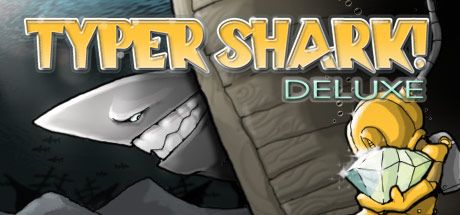
- Typer Shark Deluxe is a typing‑based computer game developed and published by PopCap Games, Inc.. (Steam Store)
- It’s classified as both an educational (typing tutor) and casual/action game: you improve typing skills, but through a fun underwater adventure instead of boring drills. (RapidTyping)
🎮 Gameplay & Mechanics
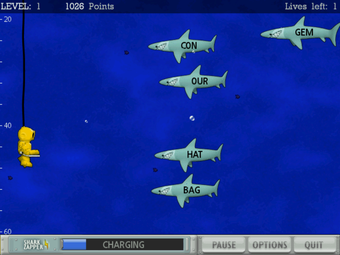
- In Typer Shark Deluxe you play as a diver exploring the depths of the ocean. As you descend, you encounter sharks, piranhas, and other sea creatures — each enemy displays a word or a set of letters on them. To “zap” (defeat) them before they reach you, you must type those words/letters quickly and correctly. (MobyGames)
- There are different modes:
- Typing Tutor Mode: A training mode focused on improving your typing skills. It offers lessons (from basic letter/word typing to sentences), displays a keyboard and fingering guide, and tracks your typing speed (WPM), accuracy, and errors — useful if you want to learn or practice “touch typing.” (UNY Journal)
- Adventure Mode: The story‑like mode where you dive across different levels/areas (oceans), face waves of creatures, and gradually increase difficulty. Progress unlocks new challenges and stronger enemies. (LaunchBox Games Database)
- Abyss Mode: An endless, survival‑style mode. Here the game gets progressively harder — the deeper you go, the tougher and faster the enemies become. Boss fights appear occasionally. Good mode for experienced typists seeking a challenge. (LaunchBox Games Database)
- There’s also a “power‑up” feature: a “Shark Zapper” that charges over time; when full you can trigger it to wipe out a wave of enemies if you’re overwhelmed. (LaunchBox Games Database)
✅ What It Offers — Strengths & Appeal
- Fun & engaging approach to typing practice: Rather than boring drills, typing is woven into an adventurous, fast‑paced underwater game. This makes it more fun, motivating especially for younger or casual players. (CCM)
- Variety of modes for different skill levels: Whether you’re a beginner needing a tutor mode or a fast typist seeking a challenge in Abyss mode, the game adjusts to your level. (UNY Journal)
- Tracking and feedback: The tutor and in‑game stats let you measure typing speed and accuracy over time — a useful tool if your goal is to actually improve typing proficiency, not just play a game. (UNY Journal)
- Accessible and lightweight: The game runs on older Windows systems and doesn’t demand heavy hardware — which made it popular back in its time. (Steam Store)
⚠️ Some Limitations / What to Know
- Graphics and overall presentation are relatively simple / old‑school (2D) — it’s not a modern, high‑fidelity game. (CCM)
- As far as I know, it’s mainly designed for solo play — there’s no built‑in online multiplayer or modern online features. (Typer Shark Deluxe)
- Because it’s an older game, support and updates are very limited (especially for modern OSes). It may require compatibility tweaks depending on your computer. (Steam Store)
🧑💻 Who Is It Good For
- People who want to improve typing speed and accuracy but dislike traditional typing drills.
- Gamers who enjoy a casual, lighthearted game with a bit of challenge and whimsy (underwater sharks + typing = fun).
- Those who grew up in the early 2000s and appreciate nostalgic games with simple graphics and straightforward gameplay.
- Anyone with a low‑to‑mid spec PC (even older Windows) — the requirements are minimal.