
Here’s a description of x360ce — what it is, how it works, and when/why it’s useful (and also what to watch out for).

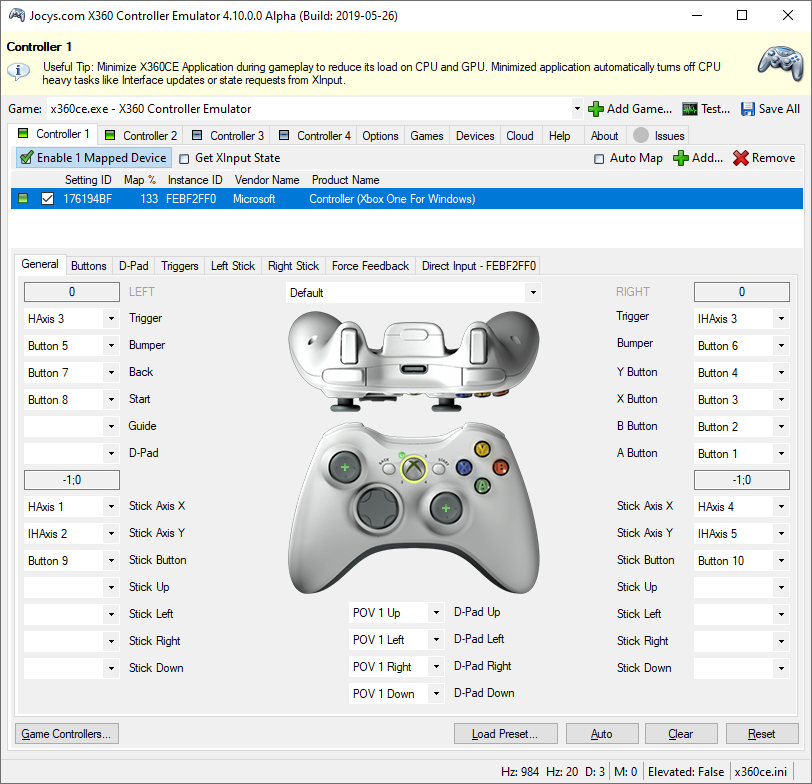
✅ What is x360ce
- x360ce stands for “Xbox 360 Controller Emulator”. (GitHub)
- Its main purpose is to let non‑XInput controllers (e.g. older DirectInput gamepads, joysticks, wheels) work in PC games that expect an Xbox‑compatible controller (i.e. XInput). (PCWorld)
- It is a free, open‑source project. (GitHub)
🎮 What It Does — How x360ce Works & Features
Here are the core capabilities of x360ce:
- Emulates an Xbox 360 controller: It intercepts input from your actual controller and “translates” it to XInput, so games detect it like a standard Xbox 360 pad. (PCWorld)
- Button/Axis mapping & customization: You can manually map buttons, triggers, analog sticks, D‑pad, etc., to match the layout you prefer (or to match Xbox layout). This is helpful for controllers with non‑standard button layouts. (Appmus)
- Force feedback / vibration support: If your controller supports vibration/rumble, x360ce attempts to emulate force feedback. (Appmus)
- Support for variety of gamepads / joysticks / wheels: Not limited to Xbox controllers — many generic or older controllers can be “converted” using x360ce for compatibility. (PCWorld)
- Per‑game configuration: Instead of a global setup, it works per game: you put x360ce files (or configure it) in the game’s directory so that mapping applies only to that game — helpful if you have different controllers or control schemes for different games. (Appmus)
- Virtual controller mode (modern versions): Recent versions (4.x) use a virtual controller driver (via a virtual gamepad emulation bus) so that the system/game sees a proper “Xbox 360‑style” controller rather than just a wrapper. (X360ce)
👍 Why It’s Useful (Especially for PC Gamers)
Given that you seem to be into PC games and possibly use different kinds of controllers / setups — x360ce can be especially handy because:
- It makes many otherwise unsupported controllers usable — helpful if you have a generic gamepad, joystick, racing wheel, or old controller that modern PC games don’t natively support.
- Flexibility & customization — you can tailor button mappings per game (e.g. set up special controls for racing games vs shooters), which can improve your gaming experience beyond default controller configs.
- Legacy support — for older games that were designed before widespread XInput adoption, x360ce helps bridge the gap and avoid forcing you to buy a new controller.
- Free and lightweight — no cost, no bloat; works even on modest PCs (assuming proper drivers and config).
- Useful for modders or multi‑controller setups — sometimes players use multiple controllers (wheel + joystick, or several gamepads), and x360ce’s virtual‑controller + mapping features help manage those setups.
⚠️ Limitations & Things to Know / Watch Out For
- Needs manual setup per game — unlike plug‑and‑play; you often must copy x360ce files to the game folder, run calibration/mapping, and save configuration. (Ngemu)
- Sometimes tricky with modern games / anti‑cheat / input detection — some games (especially newer ones) may not cooperate well with controller wrappers or virtual drivers. (X360ce)
- Force feedback / vibration may not always work reliably, depending on controller or game. (Appmus)
- Compatibility issues for some controllers — especially if they’re non‑standard, wireless, or have unusual input handling; mapping may require trial‑and‑error.
- You might need to toggle DLL or driver mode depending on game version / architecture (32‑bit vs 64‑bit). (Ngemu)
- Because it’s third‑party & emulation-based, there’s always a small risk of instability — though the project is open‑source and fairly maintained. (GitHub)
🧑💻 When / Who Should Use x360ce (Probably You)
Given your background (PC gaming, possibly older / modded games), x360ce likely fits you well if:
- You have a generic or older controller / joystick / wheel not natively supported by many modern PC games.
- You like to customize controls, or have special control schemes for different games.
- You play older games or indie games that don’t support newer controller APIs (XInput).
- You don’t mind a bit of configuration/setup — you accept per‑game tweaks in exchange for broader compatibility and flexibility.